

Infinitel's Customer Self-Service Enhancement
Enhancing and redesigning a customer self-service platform, integrating generative AI for the ultimate seamless experience


Project Overview
InfiniTel has its objective to build strong relationships between customers through online customer self-service platform in order to reduce the strain on call centre which currently includes and is characterised by long waiting times, unhelpful representatives, and poor communication.
This project is to enhance the customer service to efficiently provide effective resolutions and sufficient communication for users, which also encourages in productive user interactions.
Product
InfiniTel’s Customer Self-Service Platform (Telecommunication Service)
Role
Product Owner
UX/UI Designer
Duration
48 hours
Responsibility
-
Contributed design solutions for both new user experience and user interface to improve a customer self-service, integrating Generative AI
-
Enhanced design layout and content of the existing journey to be less complicated and distracted, ensuring users can solve their issues immediately
-
Created microcopy throughout the whole experience
-
Researched, strategised, and analysed business objectives, user concerns, user expectations, and competitors to understand core problems of the existing journey and what can be improved
-
Conducted user interviews, user personas, user journey mapping for product optimisation and the most efficient design solutions
Development
-
Developed knowledge regarding customer service/help support, and Gen AI technology
-
Improved understanding in the industry of telecommunication service
-
Learned how to work independently and individually in a very short period of time
-
Explored a wide range of target groups of telecommunication service
Researh, Competitor Analysis &
Design Solutions 🎯
A deep dive into UX research and design, showcasing methods, processes, and user insights. Explore pain points, personas, and key opportunities that shape intuitive solutions for a seamless user experience.
User Flow Overview





Customer Self-Service Journey Enhancement ⭐️
Explore final high fidelity design solutions for Infinitel's customer service enhancement that is convenient, easy, and helps users complete tasks the fastest.
Customer journey
This section includes a new user journey with unique stages that tackle user pain points of taking long time waiting for phone call for customer service support. The opportunities for development are listed in the blue box section below the screens in the flow.

High Fidelity Screens
This section includes high fidelity screens that demonstrate every key stage of users entering customer service site of Infinitel. Users will find solutions to solve their issues by exploring frequently asked questions (FAQ) section and reading useful articles of common issues, and chatting with trained AI personal assistants before reaching out to the real human assistants by chats and phone calls. The phone call menu is still there, yet it will be hidden to the last page of each FAQ section, in order to reduce the traffic of customer service.
Users can find chat assistant profiles created to solve unreliable issues from users, and to reduce the concerns that AI chat assistant is robotic and not helpful. Here, I provided the reasons users have rated for the AI chat assistants to ensure that Infinitel's customer service is useful, fast, and convenient for users to resolve their issues, without the need of contacting the real human assistant.
Loading Screen


Home

Help Support Landing
Help Support Landing (Recognition Search)
.png)

Help Support Landing (Unread Messages)
.png)
✅ Provide a list of categorised topics for users to easily select and find solutions in a short time
✅ Users are able to change language anytime during the journey
✅ Include a recognition search which display an issue category and specific topic relating to the keywords input, so that users can jump to the help articles right away.
✅ In case of users having unread messages from the chat, there will be a pop-up telling users they still have ongoing conversation to resolve.
Select a Support Topic

✅ Add personalised articles with visual elements on the top to suggest common topics and tone down seriousness of the support service, similar to reading online journal
✅ Narrow down topics regarding the issues
✅ Provide other engaging help articles that would help users find solutions easier and faster
✅ Users can still search for topics they’re looking for throughout the journey
Select More Specific Topic

✅ Narrow down the topics and increase specificity and preciseness for each topic so that users can have the most accuracy of solutions
✅ Users can still search for topics they’re looking for throughout the journey
Read the Help Article

✅ Display user engagement via reviews from other users in the community
✅ Display time of each reading for an article for users to expect
✅ Organise content in sections and add visual elements to breakdown overload information, and reduce seriousness of help support service
✅ Provide different support channels for users depending on their convenience incase the current solutions are not sufficient (articles, chat, call)
✅ Users are able to change language anytime during the journey
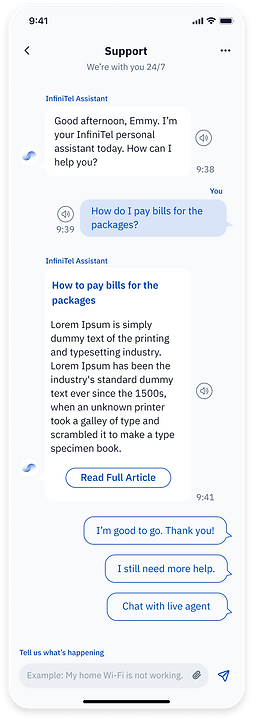
Chat with Customer Assistant
✅ Use AI as a chat assistant to help predict questions asked by users, analyse precise user problems, and provide accurate solutions, even if some are not stored in the database of the company.
✅ Use friendly and humanised tone of voice so that users don’t feel they’re talking to a bot
✅ Include a placeholder text to give a clue for users to type
✅ Bad eye-sighted users can tap a speaker icon to read the text out loud
✅ Users are able to add attachments to support their issues in the chat

Chat with Customer Assistant #2
Tab 'More'

✅ Add a menu bar that users can end the chat, export chat history, and view the profile who they are taking to which makes a chatbot more humanised.
✅ The chat history will be stored in the database that users can revisit to see solutions or resolved problems anytime
Chat Assistant Profile

✅ Add characteristics and work profile to the chatbot, making it more humanised and trustworthy.
✅ Users can see their past reviews, which encourage positive viewpoints to the service and brand
Rate the Service
✅Users can review the customer support so that the service can keep track of future improvement
✅ Users feel that they are valued and feel their opinion matters
✅ The rating will link to the chat assistant profile to gain trust from users

Rate the Service

✅ Add a modal for appreciation along with visual elements to make users feel delighted that they are taken care of
✅ Users can add additional comments for the service
Rate the Service

✅ Locate ‘Support’ menu in the middle of the navigation bar of the screen to demonstrate that InfiniTel is a customer-driven telecom service
✅ Improve and organise content on the landing page to be neater and cleaner which makes it easier to focus, skim, and understand
✅ Display a dashboard on the top to inform necessary data to users, also, remind what’s important to do/plan further
✅ Arrange everyday essential menus as Quick Menus in the middle so that users don’t have to spend time finding them
✅ Cross-sell personalised packages to users based on their activities, using personalise communication
✅ Include a search bar with a placeholder text so that users can search for their problems immediately
✅ Users are able to search by voice
✅ Use personalised, friendly communication to make users feel they’re recognised and build relationship with them
✅ Put user current services on the top so that users can choose which products/services they need help/resolutions
✅ Add personalised issues based on user existing behaviour/products of the service, using Generative AI